Integrations
The Integrations feature of the CIS SecureSuite Platform allows CIS SecureSuite Platform System Admins to connect third-party security tools to the CIS SecureSuite Platform, so key data from those tools can be viewed alongside your security posture data.
This guide covers:
About Integrations
Integrations is turned off by default. A System Admin must enable it in Admin before the Integrations menu items appear for any user. Integrations are read-only. The CIS SecureSuite Platform retrieves data from the connected tool, but it does not make changes in that tool.
Note: Third-party tools may require their own license or account. For example, Action1 requires an Action1 license. See Action1 Integration.
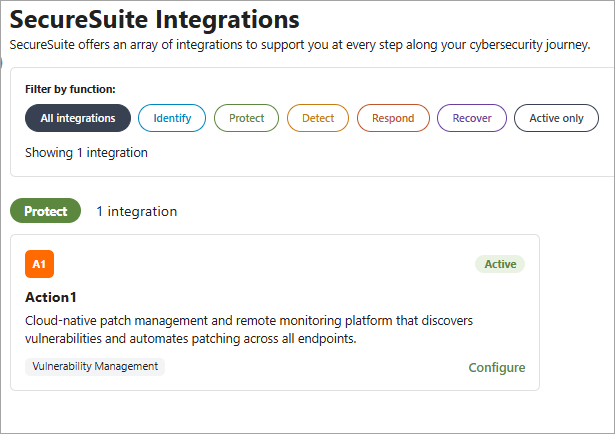
Supported Integrations
| Integration | Security Function | Description |
|---|---|---|
| Action1 | Protect | Cloud-native endpoint management platform specializing in patch management and vulnerability remediation. |
Enable Integrations
- Go to Admin > System Settings.
- Locate the Additional Features section.
- Turn on the Integrations toggle.
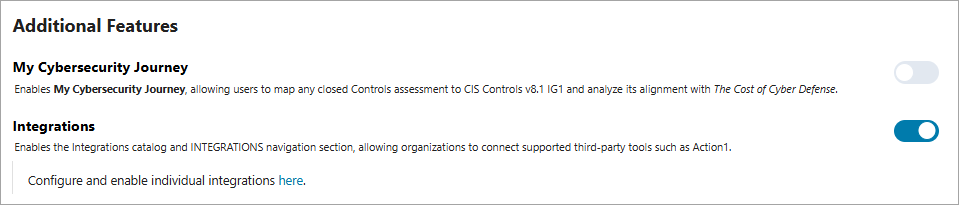
Once enabled, System Admins can connect and manage integrations from Integrations in the "Other" section of the left navigation.
Disable Integrations
- Go to Admin > System Settings.
- Locate the Additional Features section.
- Turn off the Integrations toggle.
Once Integrations is disabled, the Integrations catalog, the "Integratons" section of the left navigation, and all integration dashboards are hidden.